

I treat GTM at Chalk as an engineering problem, and the one I kept coming back to was prioritization. Thousands of accounts. Which ones deserve attention this week, and why?
A good rep answers that from memory. They know which account went quiet, who asked them to come back after a hire, who has been back on the site twice this month.
I wanted that working memory for every account we have ever touched, as defined, queryable fields an LLM can read instead of reconstructing thousands of histories. Not a dashboard. Something a model could read.
That does not work by default. Hand a model our account list with the histories attached and you blow through the context window, which is everything it can hold in one request. More raw material also means more work before it says anything useful.
The hardest part was deciding what belonged inside the working memory. I had to look across our different tools and choose which signals from each would help us better understand our accounts. I started by determining what mattered for our first workflow, which was account prioritization, and then added features as people found other things they wanted to do with the data.
So most of this post is the context engineering part: what to keep, what to leave in the warehouse, and how to write down what each field means.
First, the account has to exist in the data
We all know what an account is. What we did not have was account state: one current picture of a company that anything could read.
The data was spread across the GTM stack. Sources such as Salesforce for accounts and opportunities, Nooks for calling, HubSpot for marketing engagement, Reddit for paid, Unify for website activity, and visitor identification from Knock2 and RB2B. Each tool had its own idea of what an "account" was.
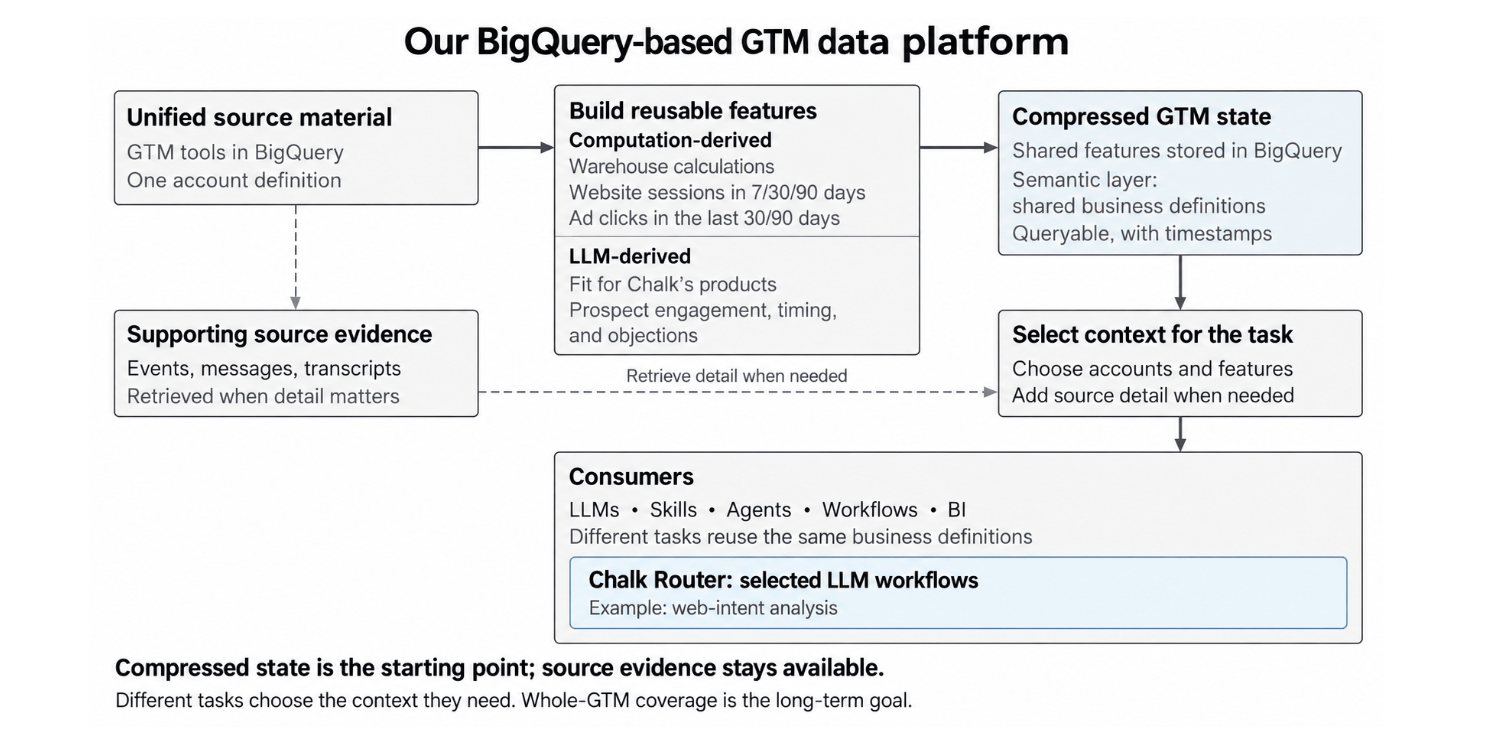
I pulled them into BigQuery and tied everything to one canonical record anchored to Salesforce. Once a Reddit ad click, a campaign reply, a sales call and a return trip to the website all hang off the same company, you can read them together instead of as four unrelated events.
Features you can count
Some fields are arithmetic from the data we've connected. For each account, we count website sessions and ad clicks over 30 and 90 days, or calculate days since the last SDR touch. Those calculations turn individual events across tools into reusable account-level features.
These are observations. They tell you what happened. Whether it means anything is a separate question.
Features you have to read
The more useful ones start as language: emails, call notes, a company's site, a job posting. Different people say the same thing five different ways. That is where an LLM earns its place. I point it at the source with a rubric, ask for structured fields back, and store those next to the counted stuff.
ML Fit and AI Fit. Two companies the same size in the same industry can need completely different things. One runs ML models in its product; the next is building agents that take actions. The word "AI" on a homepage is a weak signal. The model reads the evidence and scores it against what we know makes a fit.
Conversation labels. Take a reply along the lines of "we're interested, come back next quarter once we've hired our ML lead." That is not a no. We label it Timing - Not Now and keep the reason, hiring condition included. One query then pulls every account with that label and recent site activity, without re-reading a single thread. When someone actually works the account, they open the original exchange.
A different one: "we're focused on agents, we don't need a traditional feature store" is a signal about product focus, not a rejection. Two different states, and they should not collapse into the same label.
The two kinds of field are not interchangeable and I keep them apart on purpose. A session count is something we observed. A fit score is something a model concluded. The conclusions carry their reasoning and their source, and we refresh them when they go stale. "No response" sits on the observed side: it is computed from the absence of a reply, not a model's read on anyone's mood.

The part where a field lies to you
Every feature carries a written definition: what it measures, the window it covers, what a blank means. Ours live across data contracts, taxonomies, model rules and skill instructions. It's messier than "we have a semantic layer" makes it sound, but it gives people and agents the same definitions to work from.
These definitions are not documentation. They are what preserves the distinction a decision depends on.
Here is the one that convinced me.
If we cannot establish who owned an account for a stretch, the touch count for that period is unknown. Not zero. Zero means we know who owned it and nobody did anything.
Collapse those two and a gap in our own ownership history turns into an assertion that a rep did no work.

Two smaller ones. Inviting someone to an event is our action; their registration is theirs, so "Sent" is passive for ordinary outreach but counts as engagement for a gift someone accepted before we sent it. And several tools can see the same site visit, so our modeled visit count removes the overlap while a single tool's session count measures something narrower. Give a model both without the definitions and every account looks busier than it is.
Why compress at all
Compression is what turns account state into something a model can work across at scale. Instead of replaying every event, it compares a handful of fields: recent activity, fit, conversation status. Ask which 20 accounts have been most active on the site lately and the data layer sorts on a session count and hands back 20 rows.
The discipline is compressing without dropping what the decision depends on. Two accounts each have 12 sessions over 90 days, but one had 10 of them in the last 30 and the other had one. A single 90-day count reads them as identical, so we keep both windows.
Those two windows get compared, never added. The 30-day count sits inside the 90-day count, so summing them double-counts the same sessions.
We also move expensive work out of each request. Aggregations and saved LLM assessments serve many workflows without recounting events or reclassifying the same conversations. That leaves more room in the context window and less work for the model. Timestamps, coverage windows and refresh schedules help each workflow decide whether its context is current enough, or whether a question about right now needs fresher evidence.
For workflows that need a model in the loop, like our web-intent analysis pilot, the workflow assembles the evidence and sends the request through our Model Gateway. The account context still comes from the warehouse.
Where it ends up
Everything above exists to answer the question I opened with, and the answer does not arrive as a dashboard.
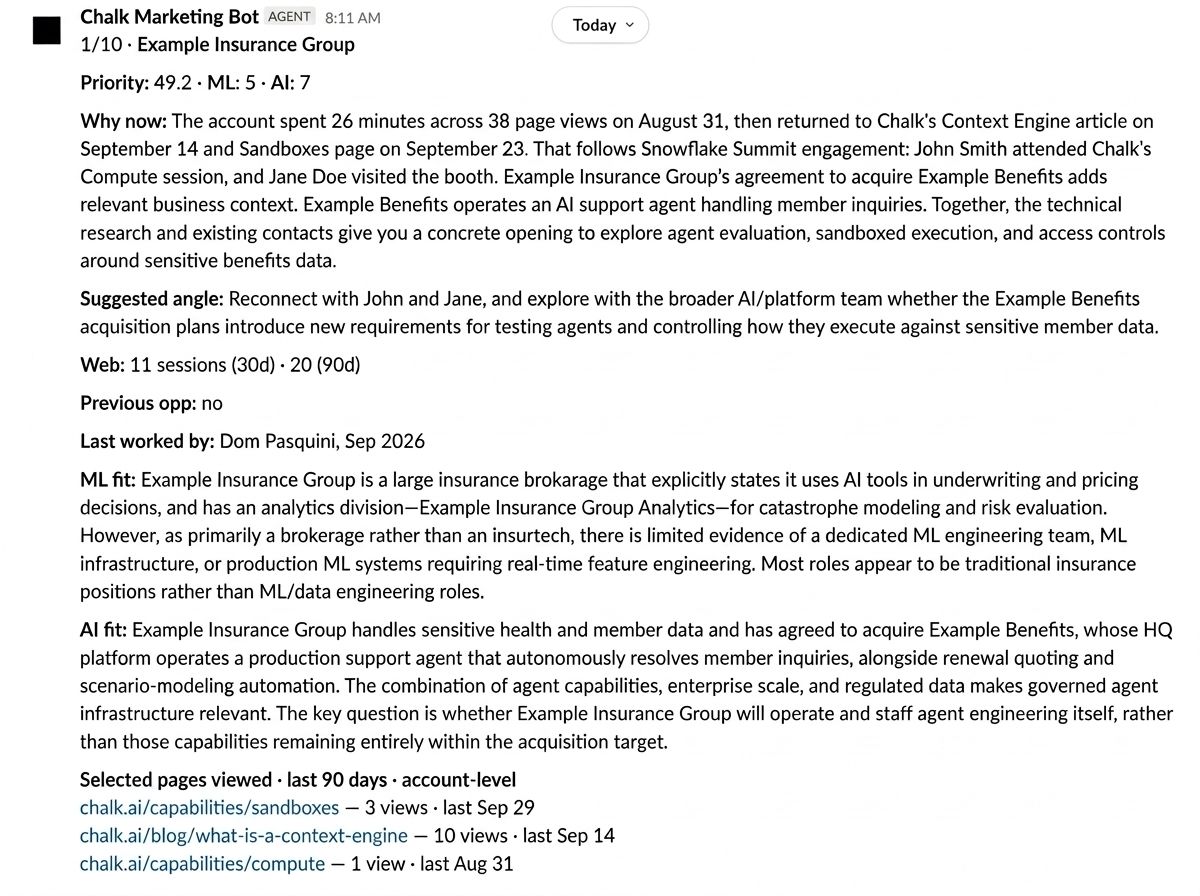
When an account is assigned, a notice goes to the rep carrying the priority score, the fit reasoning behind it, and the account context. Nobody ran a query.
Two kinds of reasoning help us understand an account. The priority explanation is computed from defined rules, showing why an account deserves attention. Alongside that, web-intent analysis uses an LLM to interpret browsing patterns and explain what signals strong interest. Keeping those origins clear helps reps understand what drove the priority and what the model saw in the activity. Together, they help reps focus their attention and start more informed conversations.
"Before, I'd get assigned an account without knowing why it was a priority or where to start. Now I know why it's in my book and have a clear angle to lead with." - John Miller, SDR, NY
What other people built on it
Because the account picture and its definitions are shared, people build on top without rebuilding the base.
An account-briefing skill pulls fit, ownership, engagement, past deals and conversation labels into one read before a call, with the messages a click away. A conference-follow-up skill combines attendees, fit, ownership and everything since the event, so outreach starts from what we already know. Funnel questions use the same stage definitions, so "where are deals stalling" means the same thing to everyone asking it. When I am building against our own setup, Chalk MCP Server lets my coding assistant read deployment details directly instead of guessing.
The loop I like most is when someone hits a missing piece of context and asks me for it. I check what it means and where it fits, and if it belongs, it goes in the shared layer. The next person's skill gets it for free.
What compression does not do
Compression leaves things out, on purpose. A label is enough to find every account with a timing objection. It cannot hold what the person actually said. When someone asks what exactly is holding a deal up, the answer is in the original thread and the skill goes and gets it.
LLMs do two jobs here, and they are worth separating. First, they turn unstructured language into reusable fields. Later, they reason over the slice of those fields relevant to the task. Neither makes the source obsolete, and storing a model's assessment in our source of truth does not make it certain. The compressed state gives the model a useful place to start; the original evidence stays there to check the reasoning or go deeper.
I built this for our own go-to-market team, but it is the same thing Chalk keeps seeing with customers. An agent needs business state it can reach, definitions it can understand, and a way to pull more detail when the task calls for it. Each new skill and workflow gets to build on that same working memory.
This is the second post in a series on what people at Chalk build on Chalk. The first was MealBot, an internal agent that can reach exactly three services.
Next from me: reusing a label everywhere is great right up until the label is wrong. How we test the prompts behind all of this with Agent Evals before they ship.